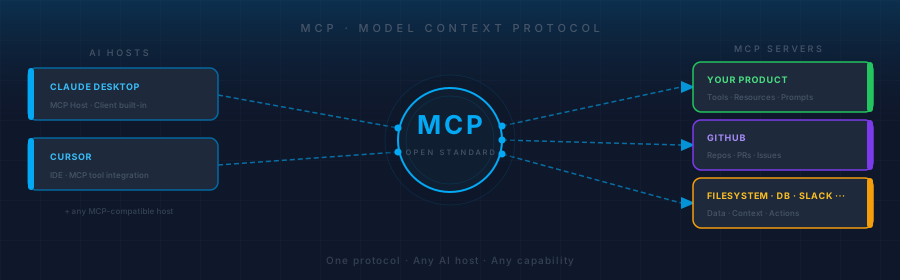
Remember when every device had a different charger? Micro-USB for your phone, mini-USB for your camera, proprietary connectors for everything else. Then USB-C arrived and standardized the whole mess. One connector, any device, any direction.
AI integrations are in the "every device has a different charger" era right now. And MCP is the USB-C.
Most developers who've heard of the Model Context Protocol think of it as a way to give an AI assistant access to files, or maybe connect a chatbot to a database. That's true, but it's a narrow view — roughly equivalent to thinking USB-C is "just for charging laptops." The real shift is in the standard itself, not any one thing the standard enables.
This post is for developers who've seen MCP mentioned but haven't dug into it, and for tech leads trying to figure out whether it's worth building against. The short answer to the tech lead question is yes — and the longer answer explains why.
The Problem MCP Solves
Before MCP, every AI integration was bespoke.
If you wanted Claude to query your product's database, you'd write a custom tool definition for Claude's API. If you then wanted Cursor to do the same thing, you'd write a different integration in a different format for a different runtime. If GPT-4 came into the picture, you'd do it a third time.
Each of these integrations lived in isolation. There was no shared format, no reuse, no ecosystem. The integration cost was paid every time, for every model, for every tool.
The deeper problem was on the data side. AI models are stateless — they don't have persistent access to your files, your databases, your APIs. So every time you wanted an AI to work with real context — the actual state of your codebase, your CRM records, your Slack history — you had to figure out how to get that context into the model. There was no standard answer. Teams solved it differently, solutions didn't compose, and the results were fragile.
The integration layer was where AI projects went to become infrastructure projects.
MCP fixes this by providing the standard. One protocol for how AI models request capabilities and context, and one protocol for how systems expose them.
What MCP Actually Is
MCP — the Model Context Protocol — is an open standard for communication between AI models and the tools and data sources they need to do useful work. Originally created by Anthropic and now maintained as an open specification, it defines a shared language that AI hosts and capability providers can both speak.
The architecture has three parts:
- MCP Hosts are AI applications — Claude Desktop, Cursor, or any AI-native tool built to support the protocol. The host is what the user interacts with.
- MCP Clients live inside the host and handle the protocol communication. You don't usually build these; they come with the host.
- MCP Servers are what you build. An MCP server exposes your system's capabilities — tools the AI can call, resources it can read, and prompt templates it can use.
The three capability types an MCP server can expose:
- Tools — functions the AI can invoke. Create a ticket, send a message, run a query, trigger a deploy.
- Resources — data the AI can read as context. A file, a database record, an API response, a log stream.
- Prompts — reusable prompt templates with parameters, exposed as structured capabilities the host can surface to users.
The protocol itself runs over standard transports: stdio for local servers, HTTP with Server-Sent Events for remote ones. The SDKs for TypeScript and Python handle the wiring — you write the business logic.
The Ecosystem Is Already Here
MCP isn't a proposal. It's in production, and the ecosystem is large enough to matter.
Claude Desktop ships with MCP host support. Cursor added MCP support for tool integrations directly in the editor. IDEs, AI coding assistants, and agent frameworks are adopting the protocol because it's cheaper to support one standard than to build and maintain custom integrations with every tool.
The server side is moving faster. There are production MCP servers for GitHub (browse repos, open PRs, read issues), PostgreSQL and SQLite (query databases, inspect schemas), Google Drive and Docs, Slack, Puppeteer (browser automation), and dozens more. A growing registry of open-source MCP servers means a developer can connect an AI tool to a substantial part of their stack in an afternoon — without writing a single line of integration code.
For the developer who has heard of MCP but hasn't tried it: the fastest way to understand it is to install Claude Desktop, add the filesystem MCP server in the config, and ask Claude to read a local file. The first time it works — the AI actually reading a file you pointed it at, through a running server you configured — the mental model clicks in a way that a spec document can't deliver.
The Part Most Developers Are Missing
Here's the reframe that matters.
Most people, when they think about MCP, think about the consumer side: an AI tool connecting to servers to get useful context. That's one valid way to look at it. But there's a producer side that's underappreciated.
Building an MCP server for your product is an architectural decision about how your product participates in AI workflows.
Think about what it meant to build a REST API in 2010. You weren't building it for one client. You were making your product's capabilities available to any HTTP client that might exist — mobile apps, third-party integrations, internal tools, things that hadn't been built yet. The API was a capability layer, and the value of that layer compounded over time.
MCP servers are the same pattern, applied to AI. An MCP server for your product doesn't connect you to one specific AI tool. It makes your capabilities available to any MCP-compatible host — and that set is growing every quarter. You build the server once, and every new AI tool that adopts the protocol becomes a potential integration for free.
The inverse is worth naming too. Products that don't expose MCP servers will increasingly be invisible to AI agents. As AI tools become how developers, analysts, and knowledge workers actually get things done, "AI-dark" products face a friction that's easy to dismiss today and harder to ignore in two years.
What Tech Leads Should Evaluate
If you're assessing whether to build an MCP server for your product, the questions worth asking:
Do you have capabilities an AI agent would want to call? If your product can do something — query data, trigger actions, retrieve records — an agent can probably use it. Anything your API can do, an MCP server can expose.
Are your users working with AI tools? Developers, analysts, and technical users increasingly work inside AI-native environments. If that's your user base, an MCP server meets them where they are.
What's the build cost? Lower than most teams expect. The TypeScript and Python SDKs are mature. A basic MCP server that exposes a handful of tools can be built in a day. The surface area you expose can grow incrementally.
What's the risk of waiting? First-mover advantage in protocol ecosystems is real. If a competitor ships an MCP server before you do and becomes the default integration in developer workflows, displacing that default is harder than establishing it.
The evaluation isn't whether MCP will matter. It will. The evaluation is how soon it matters for your specific users, and how much runway you have before "early adopter" becomes "catching up."
Actionable Takeaways
For developers:
- Install an MCP-compatible host (Claude Desktop or Cursor) and connect one MCP server this week — the filesystem server is the easiest start. The hands-on mental model is worth more than any amount of reading.
- Browse the open-source MCP server registry. The breadth of what's already available will shift your intuition about what's practical to build.
- Read the MCP spec. It's short, clear, and concrete. Understanding the three primitive types — tools, resources, prompts — is enough to start building.
For tech leads:
- Map your product's existing API surface against the MCP primitives. Most REST APIs translate directly. Start with the capabilities an AI agent would most want to use.
- Don't wait for a formal project. An MCP server for your core capabilities is a good spike for a senior engineer on a slow sprint. The cost of the experiment is low; the value of the information is high.
- Watch adoption in your users' toolchain. When the IDEs and AI tools your users work in all support MCP, the question of whether to build stops being strategic and becomes operational.
What Comes Next
MCP is early but not experimental. The protocol is stable, the tooling is production-grade, and the adoption curve is past the point where "wait and see" is a safe posture.
The comparison to REST isn't just rhetorical. REST standardized how web services communicate with clients. MCP is standardizing how AI systems communicate with everything else. The analogy holds in the timing too: teams that built REST APIs in 2010 weren't building for the smartphones and third-party ecosystems that came later. They were building a capability layer that compounded.
The question isn't whether your product will need an AI integration story. It's whether you'll be ahead of that story or behind it.
MCP is the standard forming right now. Learning it costs an afternoon. Ignoring it costs compounding leverage — quietly, until it doesn't.
